


[untitled]
4.768.00 Reviews
App Specs
- Version
- 1.1.885
- Updated On
- License
- Free
- Downloads
- 100,000+
- Developer
- [untitled]
- Categories
- Music & Audio
- Platform
- Android
Screenshots
 Analysis by AppCompare
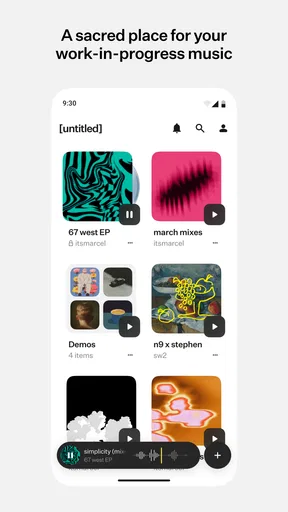
I approached [untitled] as a practical workspace for unfinished music rather than as another app for casually streaming songs. That distinction matters. Its purpose is to help musicians share, organize, and listen to work-in-progress material, so the value appears during the messy middle of a project: rough arrangements, alternate mixes, vocal ideas, and tracks that are not ready for a public release.
After spending time with it, my impression is that it is most useful when I treat every upload as part of a repeatable review habit. I can return to an idea, listen with fresh ears, and keep related material together instead of scattering files across a phone, chat thread, and cloud folder. It does not replace a digital audio workstation, but it can make the space between creating and finishing much easier to manage.
How I use it as a working music notebook
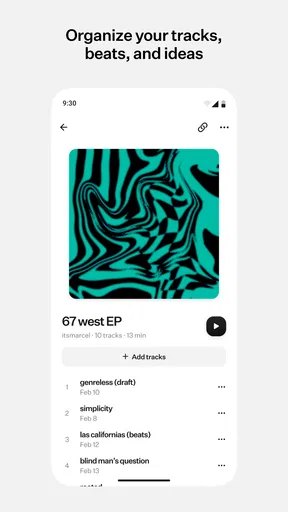
The baseline workflow is refreshingly simple: bring a work-in-progress into one place, organize it so I can recognize it later, and listen when I have enough attention to judge it properly. That sounds basic, but unfinished music often becomes difficult to follow once there are several bounces with similar names. The real benefit here is not just playback; it is giving each idea a reliable home.
I would use it after a writing session to collect the latest rough version, then again the next day while walking, commuting, or doing a non-musical task. A track that feels exciting in the room can reveal a weak chorus, a crowded low end, or an awkward transition when heard away from the session. This makes the app particularly suitable for self-review, where distance is often more valuable than another immediate edit.
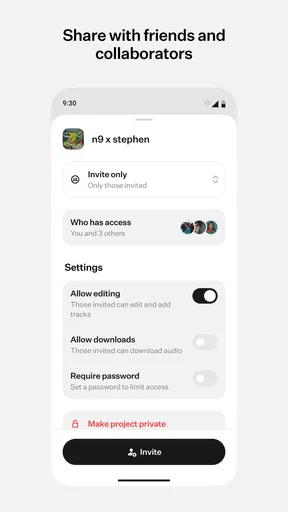
It also fits collaborative situations where one person needs to hear the current direction without opening production software. A producer can prepare a rough bounce, a vocalist can listen before recording, or a band can compare an arrangement before rehearsal. I would still keep the original session files in the main production setup, but this app gives the listening stage its own space.
My first recommendation is to decide on a naming habit before adding many files. A useful title can include the song idea, version purpose, and date in a compact form. For example, “Night Drive — chorus lift — rough” tells me more than “mix new final 2.” The app can help organize material, but it cannot rescue an inconsistent filing system. A small naming rule becomes more valuable as the number of ideas grows.
For a realistic everyday scenario, imagine finishing a late-night guitar arrangement. Instead of reopening the full project the next morning, I listen to the exported version through the app while making breakfast. I note whether the intro takes too long, whether the vocal enters naturally, and whether the final section earns its length. Later, I return to the production software with specific decisions rather than vague doubts. That separation between listening and editing is one of the strongest reasons to use a dedicated work-in-progress library.
Worth Reading Before You Choose

Switching to Android Auto Means Rethinking Your Driving Routine

Google Calendar Makes a Crowded Week Easier to Manage

Baby Panda World Brings Quick Play to Modern Phones, but Its Game Library Feels Busy

ESPN’s Live Game View Makes Following Close Games Easier

QuizzLand Review: A Good Fit for Short Trivia Breaks, Not Every Player

Basketball Stars: Multiplayer Is Fast, but Can It Recover When Matches Go Wrong?
What the basic experience gets right
The music-first focus keeps the experience more purposeful than a general file manager. A normal cloud folder can store audio, but it usually treats a bounce like any other document. A streaming service is designed for finished listening, not for comparing evolving versions. [untitled] sits between those familiar options: it is closer to a private listening shelf for unfinished work, with organization built around the creative process.
That makes it a good match for people who regularly create several versions of the same piece. It is also useful for listeners who need to give focused feedback without being surrounded by unrelated files. I would especially consider it for independent musicians, home-recording users, songwriters, beatmakers, and small creative teams that want a cleaner review routine without turning every listening session into a technical production session.
The app is free to start, which lowers the barrier for trying the workflow. It is listed for a Teen audience, and the current version is 1.1.885. The application comes from the developer [untitled], and it runs on Android 8.0 or later. Those details make it accessible to many older Android devices, although the quality of the experience will still depend on the phone’s audio hardware, storage situation, and general performance.
Settings I would check before building a library
My first settings check would be playback behavior. When reviewing music, interruptions can distort the judgment more than people expect. I would look for the options that control how tracks behave when I leave the app, connect headphones, or receive another audio notification. If the phone is also being used for calls, navigation, or video, I would test one complete listening session before relying on it for serious feedback.
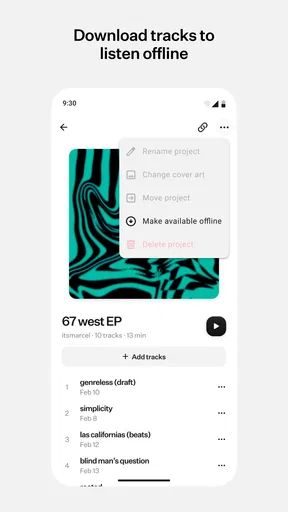
I would also check how the app handles mobile data and local storage. Work-in-progress audio can be large, especially when exported carelessly. A sensible habit is to upload or listen over Wi-Fi when possible and avoid keeping every obsolete bounce available offline. The aim is not to archive every experiment forever; it is to keep the versions that answer a real creative question.
Notifications deserve attention too. If the app is being used with collaborators, timely alerts may be useful, but constant interruptions can turn a focused listening routine into another stream of noise. I prefer notifications that tell me something actionable, such as a new version or a response, rather than reminders that encourage me to open the app without a clear purpose.
Before sharing a track, I would review its title and surrounding organization as carefully as the audio itself. A rough bounce can contain an idea that is not ready for broad circulation. The safest habit is to separate “ready for feedback” material from private sketches and to listen once more before sending anything. This is not a technical feature claim; it is a practical way to avoid confusing a disposable experiment with the version I actually want someone else to hear.
Another useful check is the phone’s own volume and headphone setup. I would not make mix decisions from one listening environment. Instead, I would use the app for translation checks: headphones for detail, the phone speaker for balance, and another familiar playback system when a decision affects the whole arrangement. The app makes switching into a listening mindset easy, but it cannot make one device an accurate reference for every situation.
Faster patterns for repeat users
Experienced use comes from reducing decisions that do not need to be repeated. I would create a small routine for every new piece: export a clearly named bounce, place it with the right project material, listen once without editing, and write down only the most important change. This prevents the common trap of uploading five versions and remembering none of them.
A particularly effective pattern is to give each version a job. One bounce might test the arrangement, another might test the vocal performance, and another might test the balance. If every file is simply called “new mix,” listening becomes a memory exercise. If each file represents a question, the app becomes a decision log. That is a more advanced use of organization than merely sorting songs into folders.
I would also avoid reviewing a track immediately after exporting it unless the goal is to catch a technical mistake. Freshly finished audio is emotionally persuasive because I still remember the effort behind it. A short break, a different room, or a next-day listen can expose problems that were invisible during production. The app works well in that gap because it makes the bounce available without forcing me to reopen the entire project.
For collaboration, I would keep feedback requests narrow. Instead of asking someone whether they “like the song,” I would point them toward one decision: does the chorus arrive strongly enough, is the vocal clear, or does the ending feel complete? A focused request makes the shared listening experience more useful and reduces the chance that a collaborator responds to a different issue than the one I am trying to solve.
Another practical habit is to keep a “current” version easy to identify while preserving older versions only when they teach something. I would not delete an earlier bounce simply because it sounds worse; sometimes it shows what changed. But I would avoid allowing every minor export to compete for attention. The best library is not the largest one. It is the one where I can find the version that matters within a few seconds.
The app’s store rating is a 4.7 average from around 1.2 thousand ratings, with 68 written reviews and over 100 thousand installs. Those figures suggest that the concept has found an audience, but they do not remove the need to test the workflow against personal habits. Someone who already has a disciplined audio review system may gain only convenience, while a creator currently relying on scattered messages may notice a much larger improvement.
Where the workflow reaches its limits
The most important limitation is scope. This is not where I would expect to edit waveforms, arrange clips, tune vocals, automate effects, or replace a full production environment. If my main need is recording and mixing, a digital audio workstation remains the better tool. I would use this app after the creative session, not instead of it.
It is also not the ideal choice for someone who wants a broad catalog of finished music, algorithmic discovery, or a conventional public streaming experience. Its strength is unfinished material and the conversations around that material. If I only want to listen to released albums, a standard music service is more natural and usually more convenient.
There is a trade-off between simplicity and control. A focused app can make listening less intimidating, but it may not offer the deep project-management structure that a professional studio archive requires. Large teams with formal permissions, detailed revision histories, or extensive metadata may prefer tools built specifically for production collaboration. I would choose [untitled] when the priority is quick sharing and organized listening, not a complete studio administration system.
The free entry point is helpful, but in-app purchases range from $6.99 to $49.99 per item. I would therefore begin with the free experience and judge the paid options against a concrete need rather than upgrading automatically. For a casual user, paid features may not justify the expense. For someone who reviews many projects and depends on the app repeatedly, the decision should be based on whether it removes a specific bottleneck in the personal workflow.
Privacy and audience awareness should remain part of the routine. Unreleased music can involve other writers, performers, or clients, so I would only share material with the people who should hear it and would avoid treating a convenient listening space as a substitute for a formal agreement. The app can support communication, but creative ownership and permission still need to be handled deliberately outside the playback habit.
Device compatibility is another practical consideration. Android 8.0 support is broad, but older phones may have weaker speakers, slower storage, or less comfortable multitasking. I would not judge a mix from a damaged speaker or a Bluetooth connection that introduces distracting delay. If the app feels slow or playback behaves inconsistently, I would first test the same file under a simpler listening setup before blaming the music or the application.
Who should make it part of a routine
I think it is strongest for creators who have plenty of ideas but lose track of their own revisions. It is also a good fit for people who want to hear work away from a desk, share a rough version without asking someone to install production software, or turn feedback into a regular step instead of an occasional event.
Songwriters may appreciate the ability to revisit arrangements after the excitement of writing has faded. Producers can use it to compare direction changes without opening a session. Bands can listen before rehearsal and arrive with a shared understanding of the next version. Even a solo creator can benefit simply by creating a boundary between making music and judging it.
I would skip it if I need advanced editing, a complete release platform, or a replacement for a carefully managed studio archive. I would also skip it if I rarely create unfinished audio and already have a simple, reliable way to share and review files. Adding another app only helps when it creates a habit that was previously difficult to maintain.
For me, the deciding question is not whether it contains every production feature. It does not need to. The better question is whether it makes the next listening decision easier. When I can find the right bounce, hear it away from the session, and send focused feedback without unnecessary setup, the app has done its job.
My verdict after settling into the habit
I see [untitled] as a useful companion for the stage of music creation that is often overlooked: listening carefully before deciding what to fix. Its best qualities appear when I combine clear naming, restrained version storage, deliberate notification choices, and a repeatable gap between exporting and evaluating. Used that way, it feels less like a generic audio container and more like a lightweight review desk.
It is not a magic solution for disorganized projects, and it cannot replace production software or a proper collaboration system for demanding teams. The paid options also mean that regular users should consider their needs before spending. Still, the free starting point makes experimentation reasonable, and the app’s focus gives it a clear purpose.
My recommendation is straightforward: try it if unfinished songs regularly disappear into folders, messages, or forgotten phone storage. Start with one active project, name each bounce according to the question it is meant to answer, and listen in at least two different environments. If that routine helps you make better decisions, the app earns its place as a practical second set of ears for work-in-progress music. If your needs are editing, publishing, or full-scale project management, another category of tool will serve you better.
Pros
- Simple interface that is easy to navigate for first-time users.
- Runs smoothly on a wide range of Android and iOS devices.
- Useful core features are accessible without a complicated setup.
- Regular updates can improve stability and add new functionality.
- Convenient design makes short
- frequent sessions easy.
Cons
- Some features may require in-app purchases or a premium subscription.
- The app may collect usage data depending on your privacy settings.
- Performance can vary on older devices or slower connections.
- Notifications may become intrusive unless they are manually adjusted.
- Limited customization may not satisfy users seeking advanced controls.
FAQs for [untitled]
What is [untitled], and what can I do with it?
[untitled] is an application or game whose main purpose depends on the version and platform you choose to download. Before installing it, review the store description, screenshots, supported features, and developer information carefully. These details can help you understand whether it offers the tools, entertainment, or user experience you expect from the app.
Is [untitled] free to download and use?
The download price for [untitled] may vary between Android and iOS, and some versions may include optional purchases, subscriptions, advertising, or premium features. Check the official Google Play Store or Apple App Store listing before downloading. Pay particular attention to the in-app purchase section so you understand which content is included at no cost and which features require payment.
Is [untitled] safe to install on my device?
For the safest installation, download [untitled] only from an official app store or a trusted source recommended by the developer. Check the publisher name, recent reviews, requested permissions, privacy information, and update history before proceeding. Avoid modified APK files or unofficial downloads, since they may contain unwanted software, altered features, or security risks.
Which devices and operating systems support [untitled]?
Compatibility can differ depending on whether you use an Android phone, iPhone, tablet, or another supported device. Before downloading [untitled], check the minimum Android or iOS version, required storage space, and any hardware requirements listed on the official store page. Older devices may experience slower performance, missing features, crashes, or limited access to newer updates.
Does [untitled] require an internet connection or personal account?
Some functions in [untitled] may work offline, while other features can require a stable internet connection for synchronization, multiplayer access, advertisements, cloud saves, updates, or account verification. You may also need to create or connect an account to use certain services. Review the app’s permissions and sign-in requirements before installing if privacy or mobile data usage is important to you.


